Getting your website to appear on Google is not just about publishing content or adding keywords. Every important page needs to be properly optimized so that search engines can understand its topic and visitors can easily find the information they need.
This is where on-page SEO becomes important.
Whether you run a small business website, an online store, a blog or a coaching centre website, following a proper on-page SEO checklist can help improve your website’s relevance, usability and search visibility.
In this guide, you will learn 15 practical on-page SEO steps to optimize your website, improve your content structure and build a stronger foundation for organic traffic.
What Is On-Page SEO?
On-page SEO is the process of optimizing individual web pages to help search engines understand their content and make them more useful for visitors.
It involves improving elements such as:
- SEO titles and meta descriptions
- Headings and content structure
- Keyword placement
- URL structure
- Internal and external links
- Image optimization
- Mobile responsiveness
- Page experience and content quality
For example, if you own a digital marketing agency and want your website to appear when someone searches for SEO services, your service page should clearly explain your services, target relevant search queries and provide useful information.
On-page SEO helps connect your website content with what people are searching for.
Businesses looking to improve their organic visibility can also explore professional SEO services to identify website optimization opportunities.
Why Is On-Page SEO Important?
On-page SEO helps Google understand what your website pages are about while making it easier for visitors to navigate and consume your content.
Here are some important benefits:
- Better search visibility: Helps search engines understand the relevance of your pages to specific search queries.
- Improved user experience: Organizes information into readable sections and makes navigation easier.
- Higher-quality organic traffic: Helps attract visitors whose search intent matches your content.
- Better content structure: Makes important information easier to find for both visitors and search engines.
- More business opportunities: Well-optimized service pages can help turn relevant visitors into enquiries.
However, on-page SEO does not guarantee higher Google rankings. It works alongside content quality, technical SEO, website authority and other search-related factors.
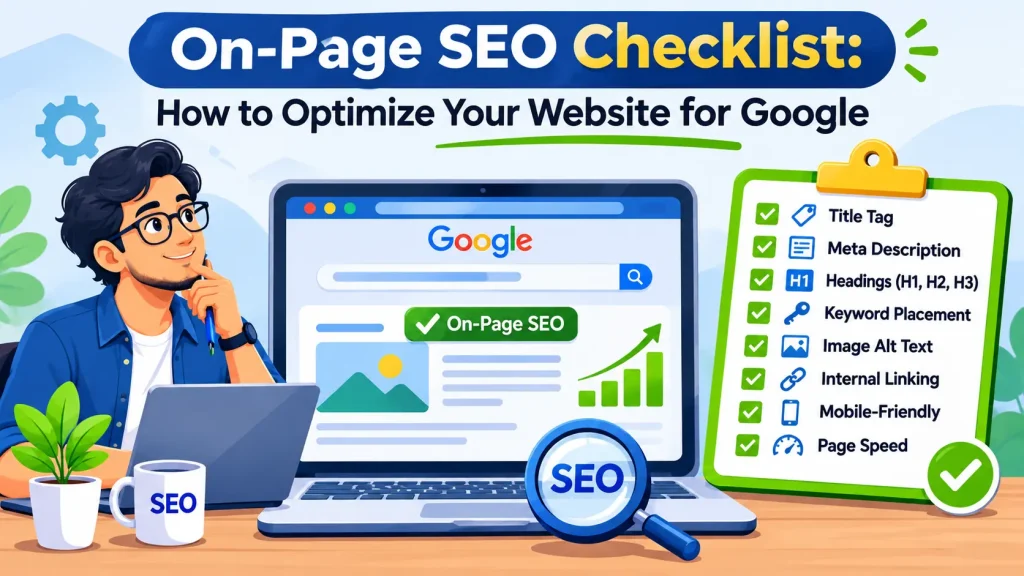
15-Step On-Page SEO Checklist
Use the following checklist whenever you publish a new webpage or update an existing one.
1. Conduct Keyword Research Before Writing
Keyword research should be the first step in your on-page SEO process.
Before creating a page, understand what your target audience searches for and what information they expect to find.
For example, someone searching for “what is on-page SEO” probably wants an explanation, while someone searching for “on-page SEO services” may be looking for a service provider.
These searches have different intentions and should not automatically target the same page.
What to check:
- Identify one primary keyword for each page.
- Find relevant secondary keywords.
- Research long-tail search queries.
- Understand the search intent.
- Review competing pages to identify missing information.
- Avoid targeting the same primary search intent with multiple pages unnecessarily.
Useful tools: Google Keyword Planner, Google Search Console, Google Trends and Google autocomplete.
2. Optimize Your SEO Title Tag
The title tag is an important element that helps search engines and visitors understand your page topic.
It can also influence the title link displayed in Google search results.
For example:
On-Page SEO Checklist: 15 Steps to Optimize Your Website
souravlabs.com/blog/on-page-seo-checklist
Follow these 15 practical on-page SEO steps to optimize titles, headings, images, links and website performance.
Best practices:
- Include your primary keyword naturally.
- Make the title relevant to the page content.
- Keep it clear and descriptive.
- Make every important page title unique.
- Avoid unnecessary keyword repetition.
- Write titles that accurately represent the page.
There is no fixed title character limit that guarantees Google will display your entire title. Google may generate a different title link based on the page content.
3. Write a Compelling Meta Description
A meta description summarizes the content of a webpage and can appear as the descriptive snippet in search results.
Although it is not a direct Google ranking factor, a useful description can help users understand why they should visit your page.
Best practices:
- Summarize the page accurately.
- Include the primary keyword naturally.
- Explain what readers will learn.
- Make the description unique for each important page.
- Avoid misleading promises.
- Write naturally instead of stuffing keywords.
Example:
“Follow this on-page SEO checklist to optimize titles, headings, keywords, images and internal links. Learn practical techniques to improve your website’s Google visibility.”
Remember that Google may generate a different search snippet depending on the user’s search query.
4. Use One Clear H1 Heading
The H1 heading communicates the main topic of your webpage to visitors.
For this article, the H1 is:
On-Page SEO Checklist: How to Optimize Your Website for Google
Your page should have a clear primary heading that accurately describes its main content.
What to check:
- Use a descriptive H1.
- Include the primary keyword naturally.
- Make sure the heading matches the actual content.
- Avoid using unrelated keywords.
- Maintain a logical heading structure.
Using one clear H1 is a useful content organization practice, not a special Google ranking requirement.
5. Organize Content With H2 and H3 Headings
Nobody wants to read a webpage that looks like one continuous block of text.
Proper heading structure makes content easier to scan and understand.
Use:
- H1: Main page heading.
- H2: Major sections.
- H3: Supporting topics under H2 sections.
For example:
- H1: On-Page SEO Checklist
- H2: What Is On-Page SEO?
- H2: Why Is On-Page SEO Important?
- H2: On-Page SEO Checklist
- H3: Optimize Your Title Tag
- H3: Write a Meta Description
- H3: Improve Internal Linking
Avoid choosing heading levels simply because of their visual appearance. Use them to represent the actual content hierarchy.
6. Place Keywords Naturally Throughout Your Content
Keyword placement helps clarify the subject of your webpage.
However, repeating the same keyword excessively does not improve content quality.
Place your primary keyword naturally in relevant locations, such as:
- SEO title
- H1 heading
- Introduction
- Relevant H2 or H3 headings
- URL slug
- Image alt text, when appropriate
- Conclusion
Use related terms and natural variations where they genuinely fit.
For example, an article about on-page SEO can naturally discuss website optimization, title tags, internal links, heading structure and image SEO.
Important: There is no universal keyword density percentage that guarantees rankings. Focus on relevance and readability instead.
7. Create SEO-Friendly URLs
Your URL should clearly communicate what a page is about.
Compare these examples:
Recommended:
souravlabs.com/blog/on-page-seo-checklist/
Avoid:
souravlabs.com/blog/?p=12345
URL optimization checklist:
- Keep URLs short and descriptive.
- Include the primary topic when relevant.
- Use hyphens between words.
- Avoid unnecessary numbers and parameters.
- Avoid changing existing URLs without a proper redirect strategy.
Descriptive URLs help visitors understand the page before opening it.
8. Optimize Images for SEO
Images improve the visual experience and help explain complex information.
However, large or poorly optimized images can affect page loading performance.
Follow these practices:
- Use relevant, high-quality images.
- Choose descriptive image filenames.
- Add meaningful alt text.
- Compress images before uploading.
- Use modern image formats such as WebP or AVIF when supported.
- Specify image dimensions to reduce layout shifts.
- Place images near relevant content.
Example:
Incorrect filename: IMG_20261115.jpg
Better filename: on-page-seo-checklist.jpg
Example alt text:
“On-page SEO checklist showing title tags, keyword placement, image optimization and internal linking.”
Alt text should describe the actual image. Do not force keywords into every image description.
Google recommends placing relevant, high-quality images near the text that explains them. Learn more from Google’s SEO Starter Guide.
9. Add Relevant Internal Links
Internal linking means connecting one page of your website to another page on the same domain.
It helps visitors discover related information and helps search engines find other pages on your website.
For example, in an article about on-page SEO, you could link to your SEO services page when discussing professional website optimization.
Internal linking best practices:
- Link to relevant service pages.
- Connect related blog articles.
- Use descriptive anchor text.
- Avoid excessive or unrelated links.
- Make sure important pages are accessible through internal links.
- Check for broken links.
You can also connect this article with other relevant SEO guides and tutorials to help readers explore related topics.
Avoid generic anchor text such as “click here” when a more descriptive phrase would be useful.
10. Include Relevant External Links
External links connect your webpage to useful information on other websites.
Linking to reliable resources helps readers verify information and explore a topic further.
For example, when discussing website loading speed, refer readers to Google’s official Core Web Vitals documentation.
Only link when the external resource genuinely adds value. You do not need to add external links simply to increase their number.
11. Make Your Website Mobile-Friendly
A significant number of users access websites through smartphones.
Your website should display properly across mobile phones, tablets and desktop screens.
Google uses the mobile version of a website’s content for indexing and ranking through mobile-first indexing.
Mobile optimization checklist:
- Use a responsive website design.
- Make text readable without zooming.
- Ensure buttons are easy to tap.
- Prevent horizontal scrolling.
- Optimize images for smaller screens.
- Check menus and navigation.
- Make contact forms easy to complete.
Test your website on actual mobile devices rather than relying only on desktop previews.
12. Improve Website Loading Speed
Visitors are less likely to have a good experience when a website takes too long to load or responds slowly.
Website performance should be part of your on-page optimization process.
Google’s Core Web Vitals include three important metrics:
LCP (Largest Contentful Paint): Measures loading performance. A good score is 2.5 seconds or less.
INP (Interaction to Next Paint): Measures responsiveness. A good score is less than 200 milliseconds.
CLS (Cumulative Layout Shift): Measures visual stability. A good score is less than 0.1.
These are Google’s recommended good-performance thresholds.
Ways to improve performance:
- Compress large images.
- Use efficient hosting.
- Enable appropriate caching.
- Minimize unnecessary scripts.
- Reduce unused CSS and JavaScript.
- Use a content delivery network when appropriate.
You can test your website using Google PageSpeed Insights.
13. Optimize Content for Search Intent
Adding keywords is not enough. Your content must answer the actual questions visitors are asking.
For example, a person searching for “on-page SEO checklist for beginners” expects actionable steps, not a long explanation of the history of search engines.
Before publishing, ask:
- Does the content answer the main question?
- Is the information useful and accurate?
- Are important subtopics covered?
- Are examples included where helpful?
- Is the content easy to understand?
- Does it offer something more useful than a generic explanation?
Focus on solving the reader’s problem rather than writing solely for search engines.
14. Add Structured Data Where Relevant
Structured data is a standardized format that helps search engines understand information on a webpage.
For example, appropriate structured data may describe:
- Articles
- Products
- Organizations
- Local businesses
- Breadcrumb navigation
- Events
Use the correct Schema.org vocabulary and follow Google’s structured data guidelines.
However, adding structured data does not guarantee rich results or higher rankings.
You can validate your implementation using Google’s Rich Results Test.
15. Check Indexing and Monitor SEO Performance
Publishing an optimized page does not automatically mean Google has indexed it.
You should monitor whether Google can discover, crawl and index your important pages.
Use Google Search Console to:
- Inspect individual URLs.
- Check indexing status.
- Identify indexing issues.
- Submit your XML sitemap.
- Monitor search clicks and impressions.
- Review the queries bringing visitors to your website.
- Identify pages that need further optimization.
If a page is not indexed, investigate the reason rather than repeatedly submitting it without fixing the underlying issue.
Remember: indexing and ranking are different. A page can be indexed without ranking prominently for its target keyword.
On-Page SEO Checklist: Quick Summary
Before publishing your next webpage, review these important optimization tasks:
- Conduct keyword research.
- Identify the primary search intent.
- Write a unique SEO title.
- Create a relevant meta description.
- Add a clear H1 heading.
- Organize content using H2 and H3 headings.
- Place keywords naturally.
- Create a descriptive URL.
- Optimize images and alt text.
- Add relevant internal links.
- Include useful external references.
- Test mobile responsiveness.
- Improve loading performance.
- Optimize content for search intent.
- Implement relevant structured data.
- Check indexing and monitor performance.
Use this checklist as part of your regular website publishing and optimization process.
Frequently Asked Questions (FAQs)
1. What is an on-page SEO checklist?
An on-page SEO checklist is a list of optimization tasks used to improve individual webpages. It covers elements such as title tags, meta descriptions, headings, keywords, URLs, images, internal links and user experience.
2. Is on-page SEO important for Google rankings?
Yes. On-page SEO helps Google understand the relevance and content of individual webpages. However, rankings depend on multiple factors, including content quality, competition, technical accessibility and other search systems.
3. How many keywords should I use on one page?
There is no fixed number. Focus on one primary search topic and include relevant secondary keywords and related terms naturally. Avoid keyword stuffing.
4. Does the meta description directly affect rankings?
Google does not use the meta description as a direct ranking factor. However, a relevant description can help users understand your page in search results.
5. How many H1 tags should a webpage have?
A clear, descriptive primary H1 is a good content organization practice. Google does not impose a strict one-H1 rule, but your heading structure should be logical and easy to understand.
6. What is the difference between on-page SEO and off-page SEO?
On-page SEO focuses on optimizing elements within your website, such as content, headings, images and internal links. Off-page SEO focuses on external signals, including backlinks and brand mentions.
7. Which tools can I use for on-page SEO?
Useful tools include Google Search Console, Google PageSpeed Insights, Google Keyword Planner, Google Trends, Screaming Frog SEO Spider and SEO plugins such as Yoast SEO or Rank Math.
8. How often should I perform an on-page SEO audit?
Review important pages regularly and whenever you make significant content or website changes. Monitor Search Console data to identify pages that need improvement.
Conclusion
On-page SEO is an essential part of building a website that both search engines and visitors can understand.
From keyword research and title optimization to internal linking, image SEO and mobile responsiveness, every element contributes to a better-organized and more useful webpage.
You do not need to implement all 15 steps in a single day. Start with your most important service pages and blog articles, identify optimization gaps and improve them systematically.
Most importantly, remember that good on-page SEO is not about adding more keywords. It is about creating relevant, useful and accessible content that satisfies what people are searching for.
If you want to improve your website’s organic visibility but are unsure where to start, the team at SouravLabs can help you identify optimization opportunities and build a practical SEO strategy.
Ready to improve your website’s search visibility? Explore our SEO services and discuss your business goals with our team.