Choosing the right keywords is important when running a Google Ads Search campaign. But selecting keywords is only part of the process. You also need to decide how closely a person’s Google search should relate to your keywords before your ad becomes eligible to appear.
This is where Google Ads keyword match types become important.
Google Ads provides three main keyword match types:
- Broad Match
- Phrase Match
- Exact Match
Each match type gives you a different level of reach and control. Choosing the wrong one can expose your campaign to irrelevant searches, while using the right combination can help you reach people who are more likely to be interested in your products or services.
In this guide, you’ll learn how Google Ads match types work, how to use them, and how to choose the right option for your campaign.
What Are Google Ads Match Types?
Google Ads match types determine how closely a user’s search query must relate to your selected keyword for your advertisement to become eligible to appear.
For example, suppose you run a digital marketing agency and want to advertise your services using the keyword “digital marketing agency”.
Depending on the match type you select, your ad may be eligible to appear for searches such as:
- Digital marketing agency near me
- Best digital marketing agency in India
- Affordable online marketing services
- Digital marketing company for small businesses
Not every match type will match all these searches.
Google uses the meaning and intent of a search, rather than relying only on identical words. This means even Phrase Match and Exact Match can match relevant variations of your original keyword.
There are three main match types, and understanding their differences is essential for managing your advertising budget.
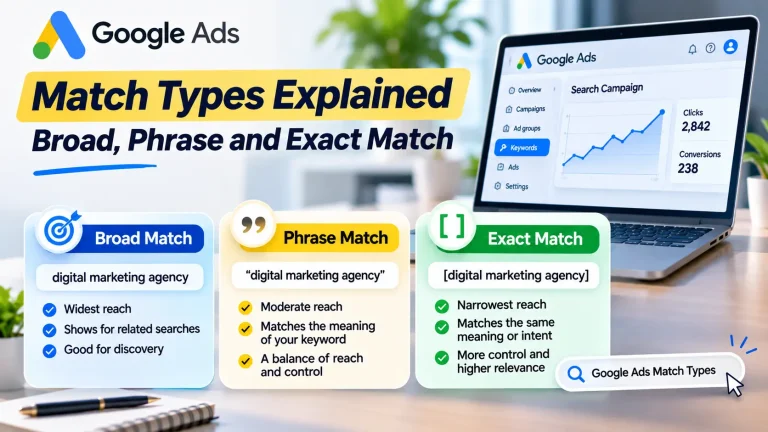
1. Broad Match: Reach a Wider Audience
Broad Match gives Google Ads the widest reach among the three keyword match types.
Your ads may appear for searches related to your keyword, even when the search does not contain the exact words you selected.
Google can consider several signals when matching Broad Match keywords, including:
- The user’s search query
- The content of your landing page
- Other keywords in your ad group
- The user’s recent search activity
- The overall meaning and intent of the search
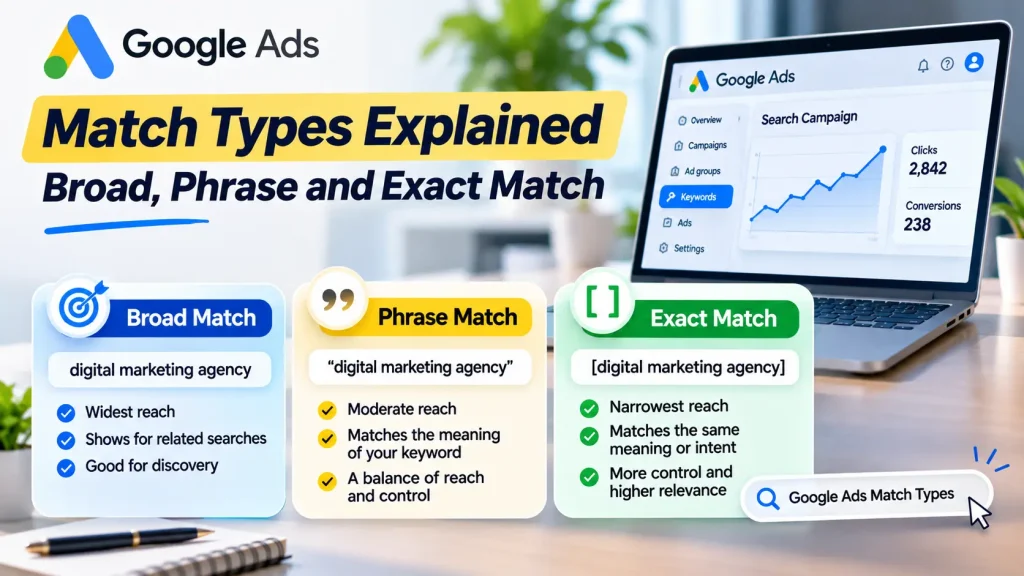
Broad Match syntax:
digital marketing agency
You simply enter the keyword without quotation marks or square brackets.
Example:
Suppose your Broad Match keyword is:
digital marketing agency
Your ad may become eligible for searches such as:
- Digital marketing agency near me
- Online marketing services for businesses
- SEO and advertising company
- Internet marketing solutions
- Marketing agency for small businesses
These are illustrative examples, not guaranteed search-term matches. Actual matching depends on Google’s systems and campaign eligibility.
Advantages of Broad Match
- Helps discover additional relevant search queries.
- Can reach a wider range of potential customers.
- Reduces the need to create extremely long keyword lists.
- Can provide more search data for Smart Bidding to optimise against.
Disadvantages of Broad Match
- Can attract searches that are less relevant to your business.
- Requires regular search-term analysis.
- Can waste budget if targeting, landing pages or conversion measurement are poor.
- Gives advertisers less direct control over the searches their ads may match.
When should you use Broad Match?
Broad Match can be useful when:
- You have reliable conversion tracking.
- You are using an appropriate Smart Bidding strategy.
- Your campaign has enough relevant conversion data to support optimisation.
- You want to discover additional search opportunities.
- You regularly review search terms and add negative keywords where necessary.
Google recommends using Broad Match with Smart Bidding because the bidding system can use contextual signals to adjust bids for individual auctions.
However, Broad Match is not automatically the best choice for every advertiser. If your campaign has a limited budget, poor conversion tracking or an unclear target audience, start with more control and expand after reviewing performance.
2. Phrase Match: Balance Reach and Control
Phrase Match offers a middle ground between Broad Match and Exact Match.
Your ads may appear when a search includes the meaning of your keyword. The search can contain additional words or express the same meaning in a more specific way.
The original phrase does not always need to appear in exactly the same word order.
Phrase Match syntax:
"digital marketing agency"
You place quotation marks around the keyword.
Example:
Suppose your Phrase Match keyword is:
"digital marketing agency"
Your ad may become eligible for searches such as:
- Best digital marketing agency
- Digital marketing agency near me
- Affordable digital marketing agency in India
- Digital marketing agency for small businesses
These examples illustrate the type of related searches Phrase Match may reach. Actual matching depends on search intent and Google’s matching system.
Advantages of Phrase Match
- Offers more reach than Exact Match.
- Provides more control than Broad Match.
- Can capture specific searches containing additional details.
- Helps advertisers target relevant variations without building an exhaustive keyword list.
Disadvantages of Phrase Match
- May still match searches that are not valuable to your business.
- Requires regular search-term monitoring.
- Does not guarantee that every matched search will have strong buying intent.
When should you use Phrase Match?
Phrase Match is a practical option when:
- You want to reach relevant variations of your main keywords.
- You are starting a Search campaign and want a balance between reach and control.
- You have a limited budget and want to avoid overly broad targeting.
- You want to test different search intents before expanding your keyword strategy.
For many small businesses, Phrase Match can be a useful starting point, provided the keywords are specific and the search terms are monitored.
3. Exact Match: More Control Over Search Intent
Exact Match provides the most control over search relevance among the three match types.
Your ads may appear when a user’s search has the same meaning or intent as your selected keyword.
However, Exact Match does not mean that your advertisement will appear only when someone types the exact same words.
Google can also match close variants, including relevant changes in word order, spelling, singular or plural forms, and searches with the same intent.
Exact Match syntax:
[digital marketing agency]
You place square brackets around the keyword.
Example:
Suppose your Exact Match keyword is:
[digital marketing agency]
Your ad may become eligible for searches such as:
- Digital marketing agency
- Digital marketing agencies
- Agency for digital marketing
- Digital marketing agency company
These are illustrative examples. Google determines whether a search has the same meaning or intent as the keyword.
Advantages of Exact Match
- Gives you the highest level of direct control among the three match types.
- Helps focus your campaign on specific search intent.
- Can reduce exposure to unrelated searches.
- Makes it easier to organise campaigns around specific services or products.
Disadvantages of Exact Match
- Usually reaches fewer searches than Phrase or Broad Match.
- Can limit traffic if your keyword list is too narrow.
- Does not guarantee a conversion or a profitable campaign.
- Still requires search-term analysis because close variants can match.
When should you use Exact Match?
Exact Match can be useful when:
- You have identified specific high-value search terms.
- You want to focus on particular products or services.
- Your campaign has a limited advertising budget.
- You want more control over which search intents trigger your ads.
- You already know which keywords generate relevant enquiries or sales.
For example, a business offering Google Ads management may use [google ads management service] to focus on a specific service-related search intent.
Broad Match vs Phrase Match vs Exact Match: Key Differences
Understanding the differences becomes easier when you compare the three match types side by side.
| Feature | Broad Match | Phrase Match | Exact Match |
|---|---|---|---|
| Syntax | keyword |
"keyword" |
[keyword] |
| Reach | Widest | Moderate | Narrowest |
| Control | Lowest | Medium | Highest |
| Matching approach | Related searches and intent | Meaning of the keyword | Same meaning or intent |
| Search-term discovery | High potential | Moderate | More focused |
| Best suited for | Expanding reach | Balancing reach and control | Focusing on specific intent |
Remember that these are relative differences, not fixed rules. Match types overlap: Phrase Match can reach searches that Exact Match can reach, and Broad Match can reach searches that Phrase and Exact Match can reach, along with additional related searches.
Practical Example: Using All Three Match Types
Let’s take a real-world example.
Suppose you own a digital marketing agency in Kolkata and offer Google Ads management services.
You want to reach businesses looking for professional Google Ads management.
Your keyword list could include:
Broad Match
google ads management
Phrase Match
"google ads management"
Exact Match
[google ads management]
The three keywords represent different levels of matching reach.
Broad Match can help discover additional related searches. Phrase Match can reach more specific searches that include the meaning of the keyword. Exact Match focuses on searches with the same meaning or intent.
You should not assume that adding all three versions will automatically produce three separate streams of traffic. Google states that broader match types include the searches covered by narrower match types, plus additional searches.
The actual keyword selected for an auction depends on Google’s keyword matching and prioritisation systems.
Which Google Ads Match Type Should You Choose?
There is no single match type that works best for every campaign.
Your decision should depend on your budget, campaign objective, conversion tracking, competition and the amount of control you need.
Here is a practical starting point:
Choose Broad Match when:
- You want to discover new relevant searches.
- You have reliable conversion tracking.
- You are using Smart Bidding appropriately.
- You can monitor search terms and exclude irrelevant traffic.
Choose Phrase Match when:
- You want a balance between reach and control.
- You are testing a new service or product.
- You want to reach more specific variations of your keywords.
Choose Exact Match when:
- You want to focus on specific search intent.
- You have identified valuable search terms.
- You want greater control over campaign reach.
For a new small-business Search campaign, starting with a focused list of Phrase and Exact Match keywords can be a sensible approach. You can test Broad Match later when your conversion tracking and optimisation process are reliable.
This is a starting strategy, not a universal rule.
How to Add Match Types in Google Ads
Follow these steps to add keywords with the correct match type to a Search campaign.
Step 1: Open your Google Ads account
Log in to your Google Ads account and select the Search campaign where you want to add keywords.
Step 2: Open the Keywords section
Navigate to the campaign’s keyword management area and select Search keywords.
Step 3: Select an ad group
Choose the ad group that is most relevant to the keywords you want to add.
For example, if your ad group focuses on Google Ads management, avoid adding unrelated SEO or social media marketing keywords to it.
Step 4: Enter your keywords
Add your keywords using the appropriate syntax:
- Broad Match:
google ads management - Phrase Match:
"google ads management" - Exact Match:
[google ads management]
Step 5: Save your keywords
Review your keyword list and save the changes.
Step 6: Monitor the Search Terms Report
After your campaign starts receiving traffic, review the actual search queries that triggered your ads.
Remove irrelevant traffic by adding appropriate negative keywords, and refine your keyword strategy based on the results.
What Is the Search Terms Report and Why Does It Matter?
The Search Terms Report shows the actual searches that triggered your advertisements.
It is one of the most useful tools for understanding whether your selected keywords are reaching the right audience.
For example, suppose you are advertising Google Ads management services.
You may find searches such as:
- Google Ads management company
- Google Ads expert for business
- Google Ads free course
- Google Ads jobs
- Google Ads certification
Some of these searches may be relevant to your business, while others may not.
If you provide paid campaign management services, searches for free courses, jobs or certifications may not be valuable leads.
You can use negative keywords to prevent your ads from appearing for unwanted searches.
Review your search terms regularly and consider:
- Which searches generate relevant enquiries?
- Which searches consume budget without producing useful results?
- Are people searching for a service, a job or free educational information?
- Should certain irrelevant terms become negative keywords?
- Are your ads and landing pages aligned with the search intent?
You can learn more from Google’s official guide to the Search Terms Report.
What Are Negative Keywords?
Negative keywords prevent your advertisements from showing for searches containing terms that you want to exclude.
For example, a digital marketing agency may not want to attract people searching for jobs or free courses.
Possible negative keywords could include:
- jobs
- vacancy
- salary
- free course
- internship
These are examples only. Before adding them, check whether the terms could also be relevant to your actual customers.
Important: Negative keyword match types behave differently from positive keyword match types. Do not assume that negative Broad, Phrase and Exact Match follow the same matching rules as regular keywords.
Read Google’s guide to negative keywords before building your exclusion list.
Common Google Ads Match Type Mistakes
Even experienced advertisers can make mistakes when managing keyword match types.
1. Using Broad Match Without Proper Conversion Tracking
Broad Match can expand your reach significantly. But if your conversion tracking is inaccurate, Google may optimise towards misleading signals.
Make sure important conversions are configured and tested before relying on conversion-based bidding.
2. Assuming Exact Match Means Identical Searches Only
Exact Match can include close variants and searches with the same intent. You should still review the Search Terms Report.
3. Ignoring Negative Keywords
Without appropriate exclusions, your campaign may spend money on searches that are not relevant to your business.
4. Adding Too Many Similar Keywords
Creating several nearly identical keywords does not necessarily improve performance. Google’s matching system can recognise similar keywords and may use one eligible keyword to match a search.
Build keyword lists around meaningful differences in search intent rather than simply repeating variations.
5. Choosing Match Types Without Considering Search Intent
A keyword may have high search volume but still attract people who are not ready to buy.
Consider whether the search indicates research, comparison or a clear intention to purchase a product or service.
6. Making Changes Without Reviewing Performance
Do not change match types simply because one option sounds better.
Review relevant metrics such as:
- Search terms
- Clicks
- Conversions
- Conversion rate
- Cost per conversion
- Lead quality
- Return on ad spend, where applicable
Use this information to make decisions.
Frequently Asked Questions
1. How many keyword match types are there in Google Ads?
There are three main positive keyword match types in Search campaigns: Broad Match, Phrase Match and Exact Match.
Negative keywords also have their own matching options, which behave differently.
2. Which Google Ads match type is best for beginners?
Phrase Match and Exact Match can provide a more controlled starting point for a new advertiser. Broad Match can also be useful when conversion tracking and Smart Bidding are properly configured.
The best choice depends on the campaign and its available data.
3. Is Broad Match better than Exact Match?
No. They serve different purposes.
Broad Match focuses on reaching a wider range of related searches, while Exact Match gives advertisers more control over search relevance.
Neither guarantees better results.
4. Does Exact Match mean the search query must be identical?
No. Exact Match can include close variants and searches with the same meaning or intent.
5. Can I use all three match types in one Google Ads campaign?
Yes. You can use Broad, Phrase and Exact Match keywords in the same Search campaign.
However, organise them according to campaign structure and search intent. Adding multiple versions of the same keyword does not automatically improve results.
6. Should I use Broad Match with Smart Bidding?
Google recommends using Broad Match with Smart Bidding because it can use contextual signals to adjust bids for individual searches.
However, you should still monitor search terms, conversion quality and campaign profitability.
7. What is the difference between a keyword and a search term?
A keyword is the word or phrase an advertiser adds to a Google Ads campaign.
A search term is the actual query a person enters into Google.
For example, your keyword might be "google ads management", while a user’s search term could be “affordable Google Ads management services near me”.
Final Thoughts
Google Ads match types play an important role in controlling how your Search campaigns reach potential customers.
Broad Match helps expand reach, Phrase Match balances reach and control, and Exact Match focuses on searches with the same meaning or intent.
But selecting a match type is only one part of campaign optimisation.
For better campaign management, you should combine relevant keyword research, accurate conversion tracking, suitable bidding strategies, negative keywords and regular Search Terms Report analysis.
The goal is not to get the maximum number of clicks. It is to reach the right people and generate valuable business results.
Need Help Managing Your Google Ads Campaigns?
Choosing the right keywords and match types is important, but a successful campaign also requires proper account structure, compelling ad copy, relevant landing pages and accurate conversion tracking.
At SouravLabs, we help businesses build and manage digital advertising campaigns through:
- Google Ads campaign management
- Keyword research and targeting
- Search campaign optimisation
- Conversion tracking
- Landing page recommendations
- Performance reporting
If you want to improve your paid search strategy, explore our Google Ads management services or contact SouravLabs.
Also Read: Google Ads vs SEO – Which Should Small Businesses in India Use?
Also Read: How to Rank #1 on Google Maps in India (Step-by-Step Guide)